Running Android on large touch screen displays


32_inch_android_touch_screen_display
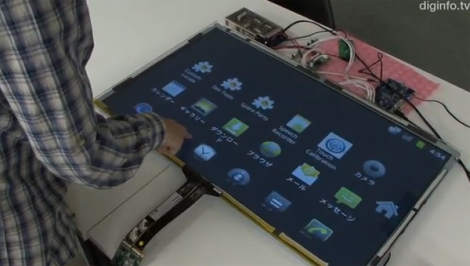
Forget Microsoft Surface, what do you think about having a 32-inch Android-powered touchscreen display in your living room? That possibility might not be too far off, thanks to the engineers over at SKR Technology in Japan.
Primarily a company that designs and builds digital signage, they were approached by several customers who wanted a large screen device that had multi-touch functionality similar to a smartphone. Since they frequently work with Windows, they tried building a solution around Windows 7, but it just didn’t function as smoothly as they would like. Instead they turned towards Android, but were disappointed to find out that none of their suppliers supported the OS.
Instead of scrapping the project, they build their own interface that allows an Android-powered device to interact with multi-touch displays. As you can see in the video embedded below the display works quite well, mirroring everything on the Android device’s screen.
While the product is not yet available commercially, we should see it come to market later this year. We hope to see an open source version sometime in the future as well, even if we can’t quite afford a 32” touch panel display.

Comments

Popular posts from this blog

USB PS3 External Hard Drive Continued...

USB PS3 External Hard Drive Continued...  Some users are having issues with the standard command line fat32 format so i found an alternative wich worked perfectly for me on a 500gb Western Digital My Passport . Read the rest after the break.

USB PS3 External Hard Drive Continued...

USB PS3 External Hard Drive Continued...  Some users are having issues with the standard command line fat32 format so i found an alternative wich worked perfectly for me on a 500gb Western Digital My Passport . You first need to download the program fat32format from the end of the post... If the standard cmd line format didn't work don't worry, just download the fat32format utility. I placed mine in the root of my c:\\    drive.  Then click the "Start Orb" , select "run" and type "cmd" into the box. Once inside the command prompt follow these steps To see the full size image scroll to the very bottom of the post Full Size 1. type "cd c://" then hit "enter" on the keyboard 2. now type "fat32format ?:"      where ? is the letter assigned to your unpartitioned hard drive 3. when prompted to continue, all data will be erased, blah, blah, blah                 hit "y"...

PS3 Owners with 3.42 & 3.50 Firmware Can now Donwgrade & Hack just like everyone else !!

PS3 System Owners with Firmware 3.42 or 3.5 REJOICE !!  There is now an inexpensive all in one solution that works on all models of the PS3 with up to 3.42 or 3.50 Firmware. It first allows you to downgrade to Firmware 3.41 then allows you to install the JailBreak / PSFreedom / Etc...    They only run about $25 + shipping wich is a bargain compared to the Official JailBreak USB Dongle .   I will have these available for sale, a link will be added shortly, along with several other essential PS3 Hacking & Modding Devices .